# serverlessDotNetStarter 
Starter template for serverless framework with following scope:
- deploy C# / NET Core 3.1 solution in **AWS cloud** using:
- Lambda
- Api Gateway
- debug and test solution locally in **Visual Studio Code**
- works operating system independent
## Prerequisites to install
- [NodeJS](https://nodejs.org/en/)
- [Serverless Framework CLI](https://serverless.com)
- [.NET Core 3.1](https://dotnet.microsoft.com/download/dotnet-core/3.1)
- [AWS-Lambda-DotNet](https://github.com/aws/aws-lambda-dotnet)
- [Visual Studio Code](https://code.visualstudio.com/)
- [C# Extension for Visual Studio Code](https://marketplace.visualstudio.com/items?itemName=ms-vscode.csharp)
Verify that everything is installed (copy & paste)
```bash
# package manager for nodejs
npm -v
# serverless framework cli > 1.5
sls -v
# dotnet (cli) > 3.1
dotnet --version
```
## Installation (copy & paste)
dotnet restore AwsDotnetCsharp.csproj
# install Lambda NET Mock Test Tool and Amazon Lambda Tools
# more details: https://bitbucket.org/overdrive/serverless-net-core.git
dotnet tool install -g Amazon.Lambda.Tools
dotnet tool install --global Amazon.Lambda.TestTool-3.1
dotnet tool list -g
# expected dotnet packages:
#
# Package Id Version Commands
------------------------------------------------------------------------
#amazon.lambda.testtool-3.1 0.10.0 dotnet-lambda-test-tool-3.1
#amazon.lambda.tools 4.0.0 dotnet-lambda
```
**For VS Code Debugging:**
> ```bash
> code --install-extension ms-dotnettools.csharp
> ```
## Debug & Test locally
I followed this guideline: (Please read in case of issues)
[How to Debug .NET Core Lambda Functions Locally with the Serverless Framework](https://itnext.io/how-to-debug-net-core-lambda-functions-locally-with-the-serverless-framework-dd1670bc22e2)
#### 1. Open Visual Studio Code
```bash
# open Visual Studio Code
code .
```
#### 2. Setup Amazon Lambda Testtool
Edit the "program" property in .vscode/launch.json file and update placeholder for {user} (placeholders marked in bold)
##### For Windows:
"program": /Users/{user}/.dotnet/tools/dotnet-lambda-test-tool-3.1
##### For MacOs / Linux:
"program": /Users/{user}/.dotnet/tools/dotnet-lambda-test-tool-3.1
More information:
- https://github.com/aws/aws-lambda-dotnet/tree/master/Tools/LambdaTestTool#configure-for-visual-studio-code,
- https://github.com/aws/aws-lambda-dotnet/tree/master/Tools/LambdaTestTool#configure-for-visual-studio-for-mac
In case of issues - try this:
"program": /Users/{user}/.dotnet/tools/.store/amazon.lambda.testtool-3.1/{nuget-version}/amazon.lambda.testtool-3.1/{nuget-version}/tools/netcoreapp3.1/any/Amazon.Lambda.TestTool.WebTester31.dll",
> **how to get the right nuget version ?**
   dotnet tool list -g

   Result:
    Package Id                      Version                   Commands
    ------------------------------------------------------------------------
    amazon.lambda.testtool-3.1      e.g. version 0.10.0       dotnet-lambda-test-tool-3.1
#### 3. Press **F5** to start the debugging and local testing of lambda function
- Hint: Lambda Mock Test Tool should be started locally on port 5050
- Click on Button "Execute Function"
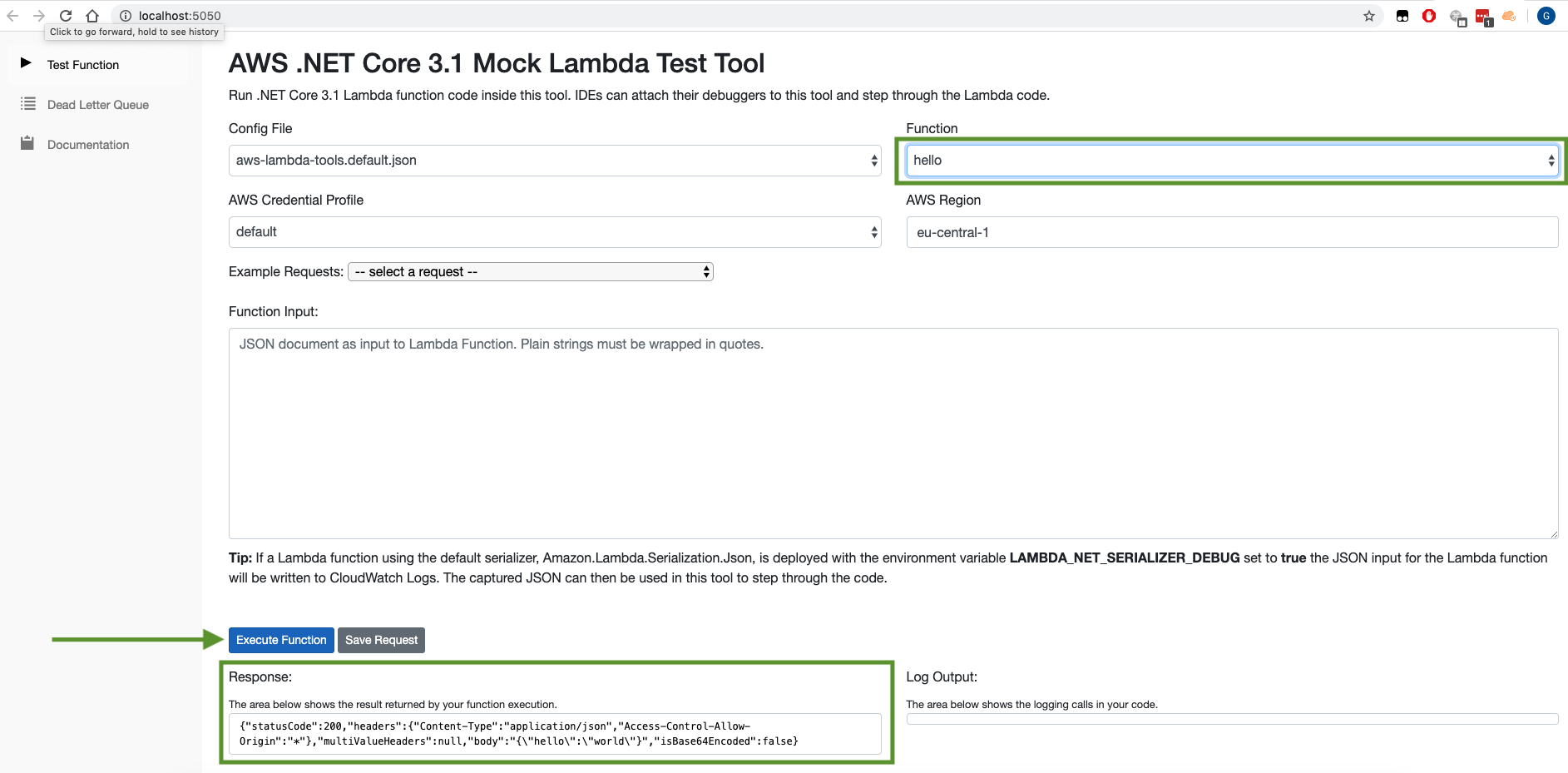
> you should get hello world as a result.
#### Test Another Example: getquerystring
1. Select function to **getquerystring** (upper right dropdownlist)
2. Insert this json value in the function input textbox for a first test:
```json
{
"httpMethod": "GET",
"queryStringParameters": {
"foo": "dfgdfg",
"woot": "food"
}
}
```
> **Mind:** For a successful response querystringParameter **foo** must be inserted
## Build Package
Mac OS or Linux
```bash
./build.sh
```
Windows
```bash
build.cmd
```
## Deploy via Serverless Framework
```bash
serverless deploy
```
A cloudformation stack in AWS will be created in background containing all needed resources
#### After successful deployment you can see following output
Service Information
service: myService
stage: dev
region: us-east-1
stack: myService-dev
resources: 10
api keys:
  None
endpoints:
  GET - endpointUrl --> https://{api}.execute-api.us-east-1.amazonaws.com/dev/hello
functions:
  hello: myService-dev-hello
layers:
  None
## Test endpoint after deployment
2 simple options:
- [Use postman as UI Tool](https://www.getpostman.com/)
- Use curl
Use the **endpointUrl** from up above.
```bash
curl https://{api}.execute-api.us-east-1.amazonaws.com/dev/hello
curl https://{api}.execute-api.us-east-1.amazonaws.com/dev/getquerystring?foo=test
```
**Mind:** For a successful response of function getquerystring the querystringParameter **foo** must be inserted
## FAQ
###### Can I use the solution with Visual Studio IDE (2017 or 2019)
1. Yes. [Here`s the guideline.](https://github.com/aws/aws-lambda-dotnet/tree/master/Tools/LambdaTestTool#configure-for-visual-studio)
###### How to add an api key
1. Setup API Key in serverless.yml file
https://serverless.com/framework/docs/providers/aws/events/apigateway/#setting-api-keys-for-your-rest-api
###### How to add additional lambda functions
1. Create a new C# Function in Handler.cs or use another file
2. Add a new function to serverless.yml and reference the C# Function as handler
https://serverless.com/framework/docs/providers/aws/guide/functions/
###### Destroy the stack in the cloud
```bash
sls remove
```
###### I deployed the solution but I get back a http 500 error
1. Check Cloudwatch Logs in AWS - the issue should be describe there.
2. For a successful response of function getquerystring the querystringParameter **foo** must be inserted
###### How can I change the lambda region or stack name
Please have a look to the serverless guideline: https://serverless.com/framework/docs/providers/aws/guide/deploying/
###### Silicon sequence :
0. run dotnet add package MySql.Data
1. do edits in Handler.cs
2. Update new functions in serverless.yml
3. run .\build.cmd
4. run serverless deploy --aws-profile pmf
5. run serverless invoke -f hello -l
6. run curl https://4row8qyxh1.execute-api.us-east-1.amazonaws.com/dev/hello